- DATE:
- AUTHOR:
- The Shift4 Updates team

[Canary] Release Notes: Quick Service POS, Menu Manager, Ordering Web, Refund App, DataNow
Canary Release Date: 23 April 2026
Planned Global Release Date: 28 April 2026
Release Version: Quick Service POS 2.60.2, Menu Manager 3.4.1, Refund App 3.6.0, Ordering Web 1.73.1, DataNow (Released Globally)
Release Type: Release Candidate
Contents: Penny Rounding on POS, DataNow Tabbed Dashboards, Various Bug Fixes
Quick Service POS v2.60.2
Enhancements:
To account for the nationwide penny shortage, penny rounding is now supported and can be enabled for any venue or revenue center with the Cash Tender enabled - for more information on this feature, go to Shift4 Venue: POS Penny Rounding
When penny rounding is enabled, all cash payment and refund transactions will be rounded to the nearest nickel with the following rounding rules:
Totals ending in 1–2 cents, round down to 0 cents – i.e. $0.71-0.72 rounds down to $0.70
3–4 cents, round up to 5 cents – i.e.. $0.73-0.74 rounds up to $0.75
6–7 cents, round down to 5 cents – i.e. $0.76-0.77 rounds down to $0.75
8–9 cents, round up to 10 cents – i.e. $0.78-0.79 rounds up to $0.80
Menu Manager v3.4.0
Enhancements:
Added Venue and Revenue Center level settings for enabling the Penny rounding feature on POS - for more information on this feature, go to Shift4 Venue: POS Penny Rounding
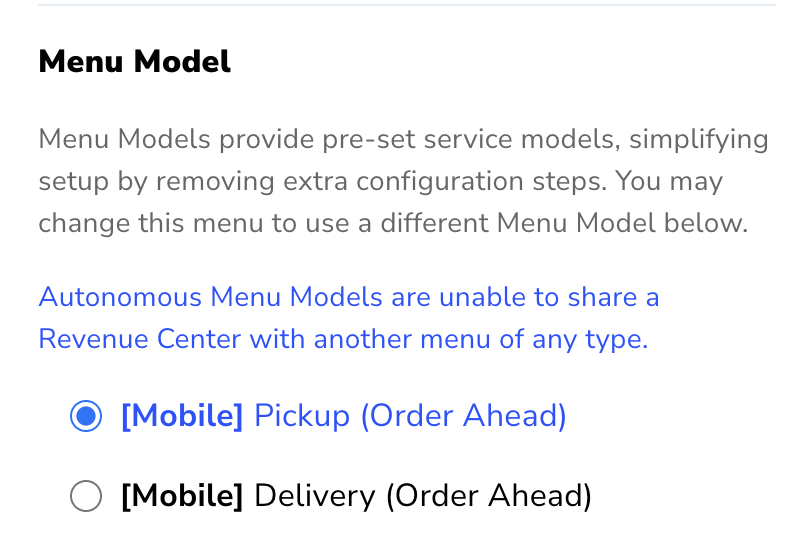
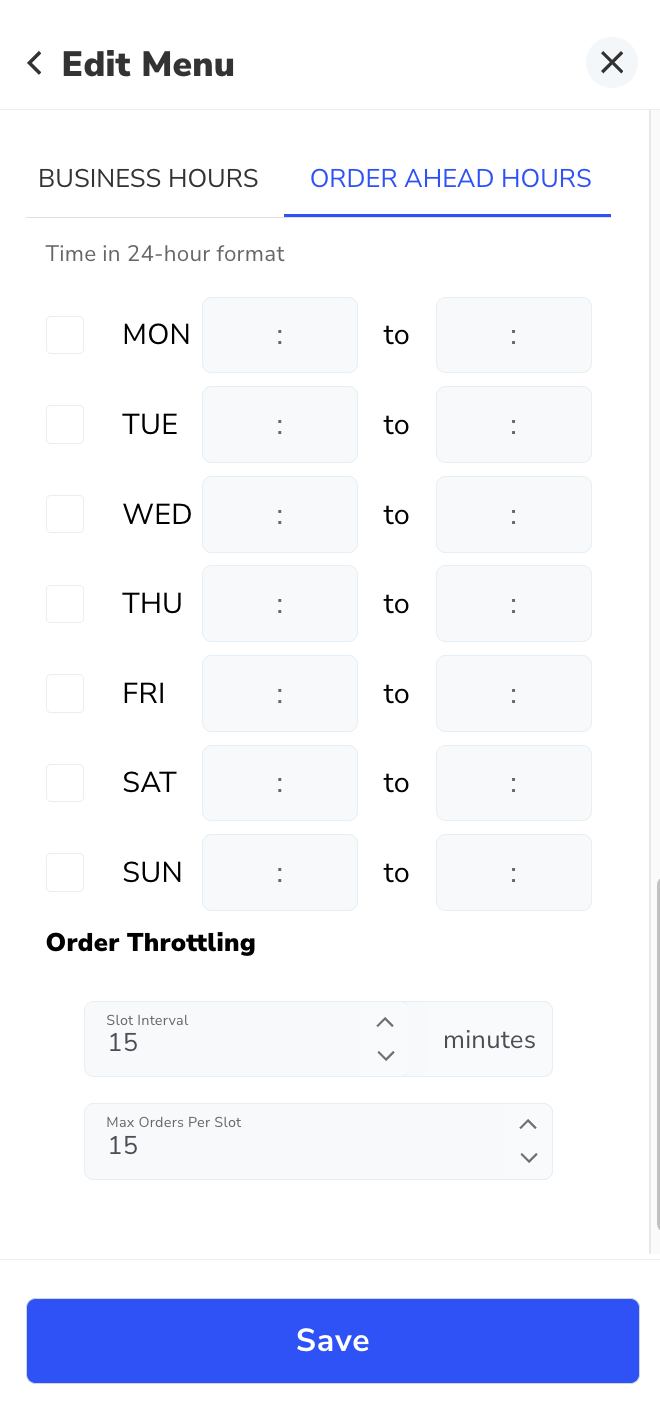
Order Ahead Business Hours and order throttling settings can now be configured in Menu Manager for menus with an Order Ahead menu model - Canopy 2.0 > Menus > Revenue Centers > Select a Revenue Center > Select a Menu > Select an Order Ahead menu model > Save > scroll down to Hours section > select Order Ahead Hours tab > enter Order Ahead Hours for each day > select order throttling settings > Save
Bug Fixes:
Fixed an issue where updated price levels could not be updated under certain conditions
Refund App v3.6.0
Enhancements:
Added rounded amount to order details for POS orders with Penny Rounding applied - for more information on this feature, go to Shift4 Venue: POS Penny Rounding
Mobile Ordering Web v1.73.1
Enhancements:
Multiple menus of the same service type in a single revenue center can now be supported – i.e. breakfast and lunch mobile pickup menus in the same revenue center
Note: Only one menu is supported during a given day/time, so the business hours should not overlap
Bug Fixes:
Fixed an issue where SMS and email POS receipts were inaccurate under certain conditions
Fixed an issue where wallet payments would sometimes fail when splitting between virtual currency and card payments
DataNow (Released Globally)
New Feature: Tabbed Dashboards
As part of our continued reporting enhancements, we are preparing to introduce tabbed navigation across select DataNow dashboards.
This enhancement is designed to consolidate related views into a single structured report experience — improving organization, reducing clutter, and allowing users to move seamlessly between operational and historical insights.
Time-Based Tabs (navigate by time period)
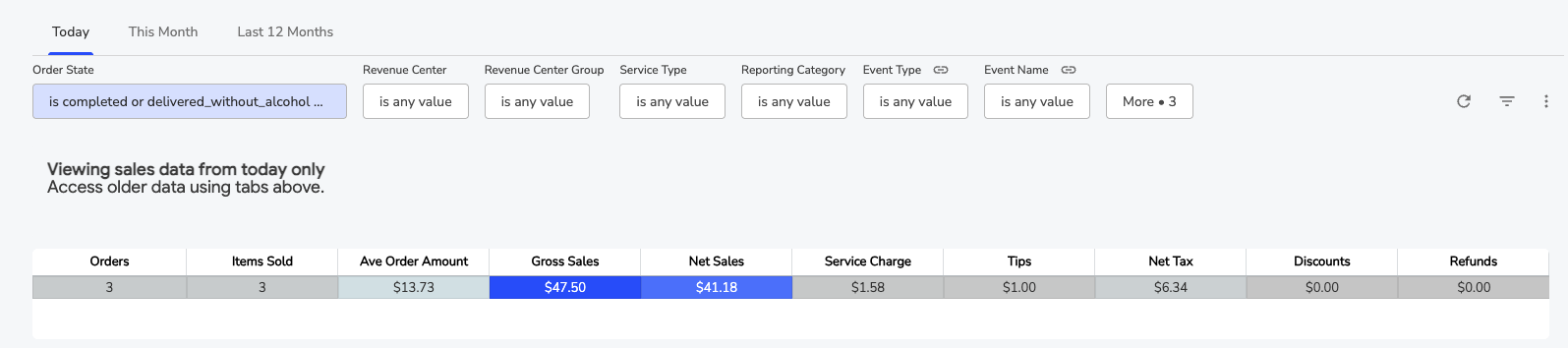
Sales Hub — Today / This Month / Last 12 Months (Historic: Revenue)
Sales Audit — This Month / Last 12 Months
Settlements — This Month / Last 12 Months
Donations — This Month / Last 12 Months
Data Scope Tabs (navigate by subject area)

F&B Sales — Executive Overview / Product Performance / Payments & Settlement / Employee Performance / Discounts & Adjustments
Historic: F&B Sales— same as above
Virtual Currency — VC KPIs / VC Spend Accountable
What this means for you
Filter selections persist across tabs — e.g. set a Revenue Center once and it stays applied as you move between tabs
Related analyses will live within a single structured dashboard
Operational and historical views can be accessed without navigating to separate reports
Dashboards will load only the active tab's tiles, improving initial performance
Reporting workflows become more intuitive and consolidated
No changes have been made to filters, data, or calculations.
New Report: Order Ledger
A new report showing a detailed list of every order, including items sold, revenue center, employee, and a full financial breakdown. Defaults to today's orders and can be filtered by date, order state, revenue center, and more.
This report can also be automated to deliver daily to your systems — ideal for workflows like employee tip processing.
For questions or assistance, contact Shift4 Venue Support at 877.559.4225, email venuesupport@shift4.com, or reach out to your Enterprise Account Manager.